Verdin Development Board
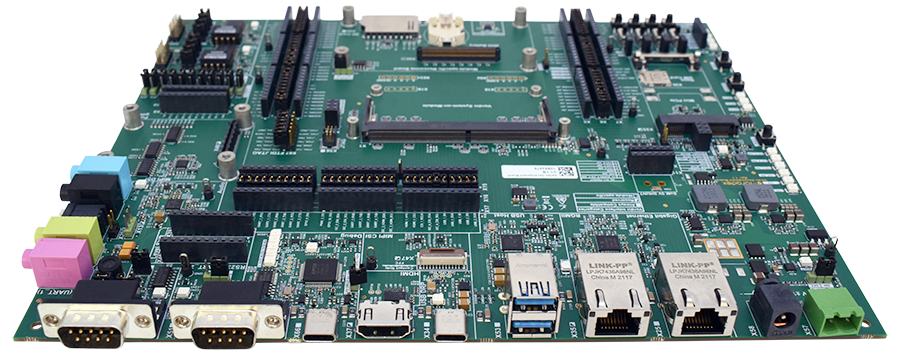
Getting Started
This section contains initial information needed to set-up the Verdin Development Board for the first time.
Recommendation for the first-time order
Toradex recommends ordering the following additional products for your first-time order:
All the products can be ordered online at Toradex Webshop.
Getting started
The Verdin SoMs come with Toradex Easy Installer pre-installed. Once you power-on the board, it will display a list of available images to be installed. Check out how to get started with the Toradex Easy Installer:
For quickstart step-by-step instructions about how to start using Torizon, please have a look at our step-by-step Getting-Started Guide:
For detailed instructions about how to start developing your software for this Computer on Module, check out our software page. The following Linux-based offerings are currently supported:
Additional information
For information on how to re-flash an operating system or image on the computer on module please check the Toradex Easy Installer article:
We have quick video tutorials:
For developing software on the platform, please browse through the list of knowledge-base articles provided in the link below:
Having trouble?
Please contact our technical support. Various option of technical support are mentioned below:
Hardware Features
Check the hardware features on the product page in toradex.com:
Block Diagram
Verdin Development Board
Verdin Development Board Block Diagram
Datasheets
Verdin Development Board V1.1
Verdin Development Board V1.1 datasheetVerdin Development Board V1.0
Verdin Development Board V1.0 Datasheet
Design Resources
V1.1 packages are compatible with the latest Verdin Family Specification. If you are planning to design a custom carrier board, please rely on them.
Verdin Development Board Design Data V1.1
- Verdin Development Board Altium Project (Altium Designer Release 10)
- Verdin Development Board Board PDF Schematics
- Verdin Development Board Assembly Drawing
- Verdin Development Board Bill of Materials (BOM)
Verdin Development Board Design Data V1.0
- Verdin Development Board Altium Project (Altium Designer Release 10)
- Verdin Development Board Board PDF Schematics
- Verdin Development Board Assembly Drawing
- Verdin Development Board Bill of Materials (BOM)
Verdin Specifications
Verdin Development Board Mechanical Models
A basic 3D model for the Verdin Development Board V1.1 can be downloaded here:
- SolidWorks CAD model 3D EASM model
- You can download the free eDrawings model viewer from SolidWorks here
- 3D STEP model that can be opened and modified in any 3D CAD
- 3D PDF model that can be opened in Adobe Reader
Older Verdin Development Board V1.0 Models
- SolidWorks CAD model 3D EASM model
- You can download the free eDrawings model viewer from SolidWorks here
- 3D STEP model that can be opened and modified in any 3D CAD
- 3D PDF model that can be opened in Adobe Reader
Design and Layout Guide
Altium Designer
Compatible Products
- Verdin AM62
- Verdin iMX8M Mini
- Verdin iMX8M Plus
- Verdin Industrial Heatsink
- Verdin DSI to HDMI Adapter
- Verdin DSI to LVDS Adapter
- Capacitive Touch Display 10.1" LVDS (through Verdin DSI to LVDS adapter)
- Verdin iMX8M Plus Mezzanine
- Capacitive Touch Display 10.1" DSI (through Verdin DSI Display adapter)
Revision History
Click to See the Product Numbering Scheme
Product Number (PID8) Format
The format of the 8-digits Product Number (PID8) is the following:
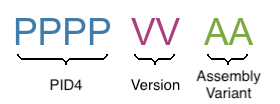
The below table describes the structure of the Product Number (PID8):
| Field | Description |
|---|---|
| PPPP | 4-digits number, indicating the Product Configuration (PID4) that describes the key properties of the product (e.g. Product Group, RAM capacity, etc.) |
| VV | 2-digits number, indicating the Major and Minor Version (in that order) |
| AA | 2-digits number, indicating the Assembly Variant |
See the complete list of available combinations on the Revision History table of the corresponding product page.
Example
Product number (PID8): 00291100:
0029: Apalis iMX6D 512MB11: Major Version 1, Minor Version 1, Version V1.1 in short
00: Assembly Variant A
A specific product revision has a lifecycle defined by the product state. Learn more about it on the Product Change Notifications.
Verdin Development Board
PN: 0156
| Product # | Product Description | Changes from Previous Version | Release Date | Related Documents |
| 01561001 | Verdin Development Board V1.0B | Initial Release | Q1 2020 | Initial release, no PCN document |
| 01561100 | Verdin Development Board V1.1A | - Implemented the changes related to the latest revision of the Verdin Family Specification - Input voltage range changed to 7-24V ±10% - Replaced Micro-USB connectors with USB-C connectors - Replaced Ethernet transceiver from Micrel KSZ9031RNXCA-QFN48 to Microchip KSZ9131RNXI - Replaced HDMI protection from NXP Semiconductors IP4786CZ32 to STMicroelectronics HDMI2C1-14HD - Replaced audio codec from CIRRUS WM8904CGEFL/RV to Nuvoton NAU88C22YG - Replaced bi-directional autosensing level shifters with unidirectional level shifters - Replaced MIPI DSI interface mezzanine connector and Type Specific mezzanine connector with LSS-130-03-L-DV-A-K-TR - Replaced buck converters AOZ2261AQI-10 with AOZ2261AQI-15 | Q2 2021 | |
| 01561101 | Verdin Development Board V1.1B | - Resolve the Bluetooth host interface strapping issue HAR-8342 (see the "Errata/Known issues" section for more details) - Increase the power rating of the CAN bus termination resistors - Other minor improvements | Q3 2021 | |
| 01561102 | Verdin Development Board V1.1C | - Don’t assemble IC25: LTC4368IDD-2#PBF power input protection IC (important note: the overvoltage, overcurrent, and undervoltage protection features are not present with this product version due to component availability constraints; extra care should be taken to ensure that the input voltage is within the range 7-24V DC ±10%) - Assemble D21 with VS-MBRB735-M3 (for providing reverse polarity protection) - Allow IC36 to be assembled with either the SN65HVD01DRCR or the STR485LVQT (due to component availability constraints) - Change the value of R165, R168, R172, and R175 from 100kOhm to 1MOhm (resolves HAR-8833, see the "Errata/Known issues" section for more details) - Change the value of R319 from 10kOhm to 1MOhm (resolves HAR-8833, see the "Errata/Known issues" section for more details) - Don't assemble C173 (resolves HAR-8934, see the "Errata/Known issues" section for more details) - Don't assemble D19 (resolves HAR-8934, see the "Errata/Known issues" section for more details) | Q2 2022 | |
| 01561103 | Verdin Development Board V1.1D | - Don’t assemble IC25: LTC4368IDD-2#PBF power input protection IC (important note: the overvoltage, overcurrent, and undervoltage protection features are not present with this product version due to component availability constraints; extra care should be taken to ensure that the input voltage is within the range 7-24V DC ±10%) - Change the RS232 transceiver (IC38) part number from TRS3122ERGER to XR32220EBER-L/TR (due to component availability constraints; important note: the replacement part is capable of data rates of up to 250 Kbps) - Change the component with the designator D30 from a diode to a 4.4nF capacitor with a 0805 package (resolves HAR-9004, see the "Errata/Known issues" section for more details) | Q3 2022 | |
| 01561104 | Verdin Development Board V1.1E | - Update the silkscreen of the PCB (resolves HAR-8976, see the "Errata/Known issues" section for more details) - Other minor changes and improvements | Q4 2022 | |
| 01561105 | Verdin Development Board V1.1F | -Change the assembly state, part number of IC25 from “not assembled”, NA to “assembled”, any of LTC4368IDD-2#PBF or LTC4368HDD-2#PBF with supporting components -Change the assembly state of D21 from “assembled” to “not assembled” -Change the assembly state, value of R3 from "not assembled", NA to "assembled", 100kOhm -Change the assembly state, value of R5 from "not assembled", NA to "assembled", 806kOhm -Change the assembly state, value of R33 from "not assembled", NA to "assembled", 82.5kOhm -Change the assembly state, value of R34 from "not assembled", NA to "assembled", 17.8kOhm -Change the value of R279, R280 from 10kOhm to 2.2kOhm -Change the manufacturer, part number of D23 from Littlefuse SMAJ30CA to any of Pulse SMAJ30CA, Comchip SMAJ30CA-HF, Rectron SMAJ30CAV-T -Change the assembly state of C98, C108 from “assembled” to “not assembled” | Q4 2023 |
Errata/Known Issues
Errata Document
Verdin Development Board Errata
Errata/Known issues
Issue trackers are not yet available in the new developer website. See it on the archived developer website.