How To Compile Firmwares for the Alternative Cores (TI)
Introduction
This article will guide you through the process of compiling firmware using the MCU+ SDK (Software Development Kit). The steps described here use make as the build system; however, you may also compile the firmware using CCS (Code Composer Studio).
This article complies with the typographic conventions.
Typographic Conventions
Throughout the Toradex documentation, the following typographic conventions are used:
$ (dollar sign) Command in the host computer (e.g. your PC)
$ Command in your PC
$$ (double dollar sign) Command in a container in the host computer (e.g. your PC)
$$ Command inside a container in your PC
# (hashtag) Command in the target device/board (e.g. Linux terminal)
# Command in the target board, e.g. Colibri iMX6
## (double hashtag) Command inside a container in the target device (Torizon)
## Command inside a container in Torizon
> (greater-than sign) Command in the bootloader (e.g. U-Boot console)
> Command in the Bootloader
No symbol: Command output
$ Command waiting for output
Output
Prerequisites
You must have the MCU+ SDK and all the necessary tools configured (see Setting Up MCU+ SDK and Toolchain for HMP Development).
Understanding TI’s SDK Structure
In this article, ${SDK_INSTALL_PATH} refers to the path where the SDK is installed. For example, in Linux, ${SDK_INSTALL_PATH} refers to ${HOME}/ti/mcu_plus_sdk_{soc}_{version}/
Most example applications provided by TI's MCU+ SDK are available at ${SDK_INSTALL_PATH}/examples/drivers. Within each example folder, you will find variants of the source code for each processor and core, as shown below:
$ cd ${SDK_INSTALL_PATH}/examples/hello_world
$ tree -L 2
.
├── am62x-sip-sk
│   ├── a53ss0-0_freertos
│   ├── a53ss0-0_nortos
│   ├── m4fss0-0_freertos
│   ├── m4fss0-0_nortos
│   └── r5fss0-0_freertos
├── am62x-sk
│   ├── a53ss0-0_freertos
│   ├── a53ss0-0_nortos
│   ├── m4fss0-0_freertos
│   ├── m4fss0-0_nortos
│   └── r5fss0-0_freertos
├── am62x-sk-lp
│   ├── a53ss0-0_freertos
│   ├── a53ss0-0_nortos
│   ├── m4fss0-0_freertos
│   ├── m4fss0-0_nortos
│   └── r5fss0-0_freertos
└── hello_world.c

19 directories, 1 file
The following section describes how to compile the Hello World example shown above, which is available at ${SDK_INSTALL_PATH}/examples, for the Verdin AM62.
The Verdin AM62 is based on the am62x-sk SoC variant. We will compile the following example from the m4fss0-0_freertos directory to use FreeRTOS on the Cortex-M4 core.
Compiling Your First Firmware
Setting Up SysConfig
SysConfig is a graphical user interface designed to configure pins, peripherals, clocks, and other components on TI products. SysConfig is available as part of the CCS IDE integrated development environment as well as a standalone application.
In this article, you will use the SysConfig tool as a starting point for firmware development by writing and compiling a Hello World program for the alternative core.
It is mandatory to have the SysConfig parameters configured as explained below, to ensure the firmware will be compatible with the processor's available memory and prevent errors.
Run the following command to open the SysConfig UI:
$ make -s -C ${SDK_INSTALL_PATH}/examples/am62x-sk/m4fss0-0_freertos/ti-arm-clang/ syscfg-gui
Then, you will need to enable the IPC (Inter-Processor Communication). After that, disable the PDK IPC so you can change both the number of buffers and their size to 64, as shown below:
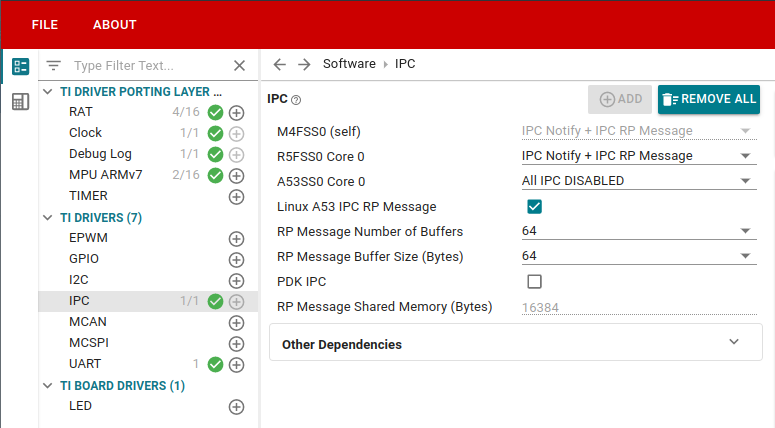
The IPC is used to add the resource table and enable the drivers in the resulting firmware. The resource table, in turn, is needed by remoteproc to load the firmware and start the alternative core.
Compiling the Hello World Example
After configuring the SysConfig, build the Hello World example with the following command:
$ make -s -C ${SDK_INSTALL_PATH}/examples/hello_world/am62x-sk/m4fss0-0_freertos/ti-arm-clang/
You can check the binaries built:
$ tree -L 1 ${SDK_INSTALL_PATH}/examples/hello_world/am62x-sk/m4fss0-0_freertos/ti-arm-clang/

.
├── example.projectspec
├── generated
├── hello_world.mcu-m4f0_0.release.strip.out
├── hello_world.release.appimage
├── hello_world.release.appimage.hs_fs
├── hello_world.release.appimage_xip
├── hello_world.release.map
├── hello_world.release.out
├── hello_world.release.rprc
├── hello_world.release.rprc_xip
├── linker.cmd
├── makefile
├── makefile_ccs_bootimage_gen
├── makefile_projectspec
├── obj
└── syscfg_c.rov.xs
To learn how to deploy the firmware, refer to How To Load and Run Firmwares Into Alternative Cores (TI) article.