How To Create a Custom Package Source for Torizon Cloud
Introduction
A Torizon Cloud account uses package sources to provide update candidates to its devices. Toradex includes default package sources for standard update workflows.
A custom package source is useful when packages must be stored, hosted, and distributed independently from the metadata managed by Torizon Cloud. For example, it can serve a curated set of packages from private infrastructure, provided that the infrastructure is publicly accessible to Torizon Cloud and the devices that perform updates.
This article explains how to:
- Describe the packages in a delegation metadata file
- Sign the metadata file with
uptane-sign - Host the signed metadata file and the package payloads
- Add the resulting package source to a Torizon Cloud account
- Automate the process with a CI/CD pipeline
Using a custom package source is an advanced workflow. For workflows that only require pushing customized Torizon OS images or application containers to a Torizon Cloud repository, use TorizonCore Builder instead.
This article complies with the Typographic Conventions for Toradex Documentation.
Prerequisites
- Access to a Torizon Cloud account. For more details, refer to First Steps with Torizon Remote Updates
- The
uptane-signtool at least version2.0.2 - A public/private key pair for signing metadata. Torizon Cloud supports the following key types:
RSA2048- Not recommended for new deploymentsRSA4096Ed25519
- A web server that hosts the signed metadata file and package payloads for public download
Handle signing keys according to proper key management practices. Leaked signing keys can allow a bad actor to add harmful packages to the package source. For guidance on how to keep signing keys offline and secure, refer to Offline Signing Keys.
Create the Delegation Metadata File
A delegation metadata JSON file defines a package source and lists the packages available from it. This JSON file contains metadata only and does not include the package payloads. A separate HTTP server hosts the package payloads for download.
The following snippet shows an unsigned delegation metadata file for Toradex bootloader packages:
{
  "_type": "Targets",
  "expires": "2120-12-31T12:00:00Z",
  "targets": {
    "bootloader/apalis-imx6/u-boot-ota.bin-2022.07-6.1.0-devel+git.e092e3250270-n127": {
      "hashes": {
        "sha256": "c8da29ddc55e39b097b15523eebd3b51a1c0931deab0a425dcaf0b2e3f1108d3"
      },
      "length": 598856,
      "custom": {
        "name": "bootloader/apalis-imx6/u-boot-ota.bin",
        "version": "2022.07-6.1.0-devel+git.e092e3250270-n127",
        "hardwareIds": [
          "apalis-imx6-bootloader"
        ],
        "targetFormat": "BINARY",
        "uri": "https://artifacts.toradex.com/artifactory/torizoncore-bootloader-prod-frankfurt/kirkstone-6.x.y/nightly/127/apalis-imx6/u-boot-ota.bin",
        "createdAt": "2022-12-23T02:57:20Z",
        "updatedAt": "2022-12-23T02:57:20Z",
        "commitSubject": "2022.07-6.1.0-devel+git.e092e3250270-n127",
        "commitBody": "Bootloader package for machine apalis-imx6.",
        "bootloader": {
          "ddOptions": "seek=2",
          "dtVersion": "2022.07-6.1.0-devel+git.e092e3250270",
          "env": {
            "type": "embedded",
            "resetOnUpdate": true,
            "embeddedOffset": 380874,
            "embeddedSize": 5198,
            "keepVars": null,
            "setVars": null
          }
        }
      }
    }
  },
  "version": 10
}
Fields Explained
_type: AlwaysTargets.expires: The date after which the update process no longer accepts this file.- Set this field to a distant date if the file must remain valid for an extended period. Alternatively, set a realistic expiry date according to the requirements of the package source.
- Future revisions of this file can update the expiry date.
targets: The object that contains all packages available in this package source. The preceding example contains a single package. Any package not listed in this object is not a valid update candidate.- A key under
targets, for example,bootloader/apalis-imx6/u-boot-ota.bin-2022.07-6.1.0-devel+git.e092e3250270-n127: The package name and package version for a specific package.- In the preceding example, the package name is
bootloader/apalis-imx6/u-boot-ota.bin, and the package version is2022.07-6.1.0-devel+git.e092e3250270-n127.
- In the preceding example, the package name is
hashes: The hashes of the package payload, indexed by hash algorithm.- For most package types, the
sha256field contains the SHA-256 hash of the file used in the update. The update fails if this hash does not match the package payload. - For OS/OSTree packages, this field contains the OSTree hash of the OSTree deployment or commit used in the update.
- For most package types, the
length: The size, in bytes, of the package payload used in the update.- For OS/OSTree packages, this field is always
0.
- For OS/OSTree packages, this field is always
custom: The object that contains Torizon Cloud-specific package metadata.name: The package name as it appears in the Web UI.version: The package version as it appears in the Web UI.hardwareIds: A list of device-side components that this package can update.- In the preceding example, the package has only one hardware ID,
apalis-imx6-bootloader. A device must have a matchingapalis-imx6-bootloadercomponent for this package to be compatible.
- In the preceding example, the package has only one hardware ID,
targetFormat: The package format. For OS/OSTree packages, this field is alwaysOSTREE. For other package types, it isBINARY.uri: The URL that hosts the package payload. Devices download the package from this URL during an update.createdAt: The date and time this package was added to the JSON file.updatedAt: The time and date of the last update to this package entry in the JSON file.commitSubject(optional): Similar to theversionfield. This field exists primarily for compatibility with the framework.commitBody(optional): A text description of the package. This field exists primarily for compatibility with the framework.bootloader: Type-specific metadata for bootloader packages. Different package types may define their own type-specific metadata fields.version(top level): The version counter for the JSON file as a whole.
The version counter starts at 1. Increment it by 1 for each new revision of the JSON file. Updates that use this package source can fail if a new revision keeps the same version counter. Do not decrease the version counter, as this can break updates.
OS/OSTree Type Packages
The following snippet shows an OS/OSTree package entry:
"kirkstone/apalis-imx6/torizon-upstream-rt/torizon-core-docker/nightly-6.8.8-devel-20260520+build.1084": {
  "hashes": {
    "sha256": "27b2ad71a565aed0339387461d8c9c5225ee4c8c986589d2b99adfc91719a77d"
  },
  "length": 0,
  "custom": {
    "cliUploaded": false,
    "name": "kirkstone/apalis-imx6/torizon-upstream-rt/torizon-core-docker/nightly",
    "version": "6.8.8-devel-20260520+build.1084",
    "hardwareIds": [
      "apalis-imx6"
    ],
    "targetFormat": "OSTREE",
    "createdAt": "2026-05-20T11:30:41Z",
    "updatedAt": "2026-05-20T11:30:41Z",
    "uri": "https://tzn-ota-tdxota.s3.amazonaws.com/ostree-repo/"
  }
}
All required fields described earlier appear in this entry. OS/OSTree packages also require one additional field:
cliUploaded: Set this field tofalse.
For more examples of the file format, inspect the delegation files from Toradex-provided package sources. These files are already signed.
In the Torizon Cloud Web UI, open the Packages page and select Manage Sources in the top-right corner. From the list of package sources, select the edit button for a source to reveal the URL of its delegation JSON file. Use that URL to download or view the file.
Sign the Delegation File
Set SIGNING_PRIVKEY to the path of the private key file and SIGNING_PUBKEY to the path of the corresponding public key file. Then run the following command to sign the delegation metadata file:
$ uptane-sign sign-json -k "${SIGNING_PRIVKEY}" \
                        -p "${SIGNING_PUBKEY}"  \
                        -i "unsigned.json" > "signed.json"
This command produces a signed version of the JSON file, ready to serve as a package source.
The final signed JSON file must not exceed 8 MB. This security limit caps the size of delegation metadata files. Exceeding it can cause updates to fail.
When a file approaches this limit, remove package entries to reduce its size or split the packages across separate package sources. The limit applies per JSON file.
Upload the Signed JSON
Upload the signed JSON file to a web server that hosts files for download over HTTP or HTTPS. Toradex uses Amazon S3 buckets and Artifactory for this purpose.
The hosting server must be publicly accessible because both Torizon Cloud and the devices that perform updates need to reach the file.
Store the Package Payload Files
The delegation JSON file describes the package source, but the update payloads also need to be hosted. As with the delegation file, the update payloads must remain accessible during the update process. The same server can host both the signed delegation file and the package payloads.
Make sure the uri field in the delegation JSON file matches the actual location of each update payload.
Add the Package Source to Torizon Cloud
After hosting the signed delegation metadata file and the update payloads, add the package source to a Torizon Cloud account.
The simplest approach is to create a delegation reference JSON file. This file does not describe the packages directly. Instead, it describes the signed delegation metadata file, the key used to sign it, and the URL where Torizon Cloud can fetch it.
The following example shows a delegation reference file for the Toradex bootloader package source:
{
  "keys": [
    {
      "keyval": {
        "public": "-----BEGIN PUBLIC KEY-----\nMIIBIjANBgkqhkiG9w0BAQEFAAOCAQ8AMIIBCgKCAQEAsOaQ7xMgkWVTpexsfeEk\nS5x7tyCdjX5kmZhZEZtg3QYU7+o+zFkQQTCKn6T18xsDsTGIUa6UoP4R1z2O3qrF\nOIeQugKDMLQpbCTxhYYseO0Qere93pHyujrIfDJCT83xC5d4VmEy4UepmhwxBD2k\nToazsExlEZ3jHL7isIoMZvWB0jfeQrLhtzuS7RSsmSOOZtMdCYeA2Cepj4R/rPVK\n8HfTK3ah3mV5Xqgj8IP/Og+QRadg0Uh4QZM9cFmy+AL85pm4c0YDk6tkdYsrgbU3\n+SSEcav25FN3ZxxGKkhXOm5/744wGyoOqwsK2u2pFsOfaHyp69g/y77dWkk/BAD0\ndQIDAQAB\n-----END PUBLIC KEY-----\n"
      },
      "keytype": "RSA"
    }
  ],
  "delegationMetadata": {
    "name": "tdx-bootloader",
    "keyids": [
      "ec79ec414af70b2cf6172a527349cfeffd010c946e5d2df61a77a32463416137"
    ],
    "paths": [
      "bootloader/*"
    ],
    "threshold": 1,
    "terminating": true
  },
  "fetchUrl": {
    "uri": "https://artifacts.toradex.com/artifactory/torizoncore-bootloader-prod-frankfurt/tdx-bootloader.json",
    "delegationName": "tdx-bootloader"
  }
}
Delegation Reference Fields
keys: An array that describes the keys used to sign the delegation metadata file.public: The public key information for a signing key.keytype: The type of signing key.name: The name of this package source. This value appears in the Web UI.keyids: The key ID that corresponds to the key used to sign the delegation metadata file. After signing the file, open the signed JSON file and locate thekeyidvalue in thesignaturesarray. Use that value as the key ID here.- When multiple keys sign the delegation metadata file, list all key IDs here.
paths: A list of package paths from the delegation metadata file that remain visible after adding the package source.- In the preceding example, all packages that match the
bootloader/*naming pattern appear in the account after the package source is added. - To include all packages listed in the delegation metadata file, use
*as a wildcard.
- In the preceding example, all packages that match the
threshold: Keep this field as1.terminating: Keep this field astrue.uri: The URL of the signed delegation metadata file.delegationName: The same value used in the precedingnamefield.
Add the Package Source in the Web UI
After creating the delegation reference file, upload it to a server. Then add the new package source in the Torizon Cloud Web UI:
-
Open the
Packagespage on the target Torizon Cloud account, then selectManage Sourcesin the top-right corner: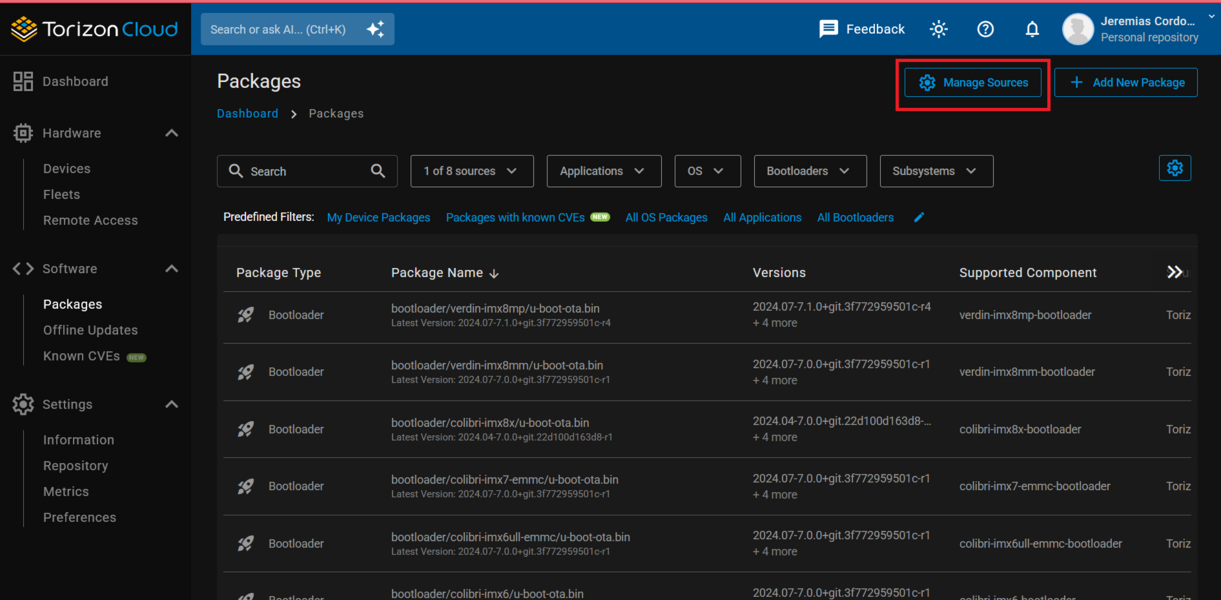
-
Select the
Add Sourcebutton: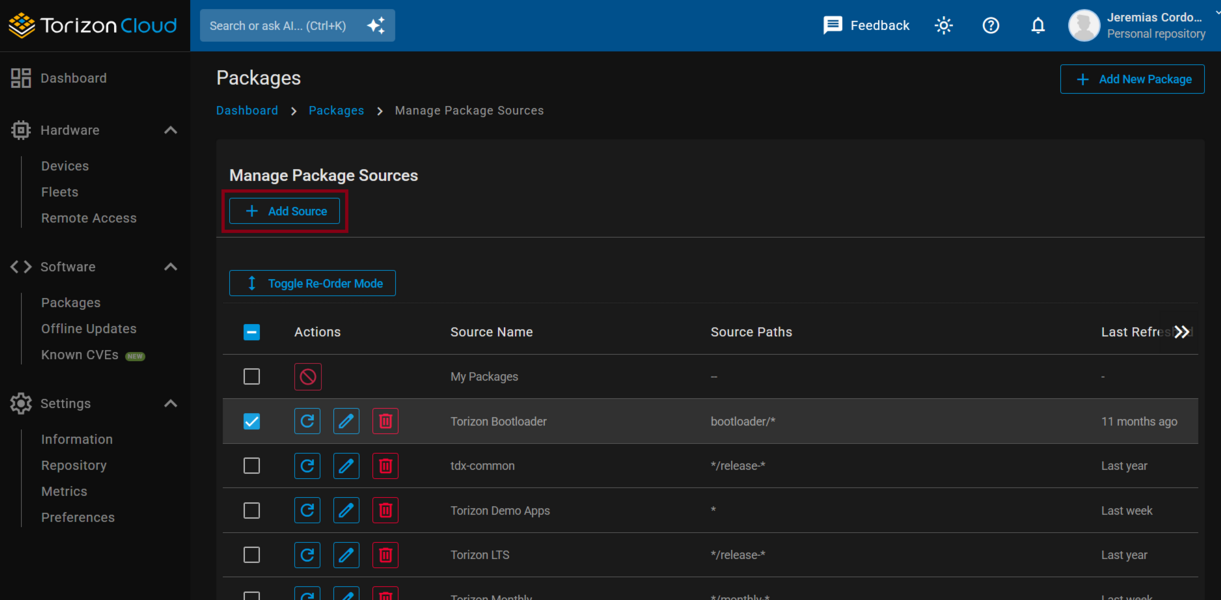
-
Choose the
From URL (Recommended)option: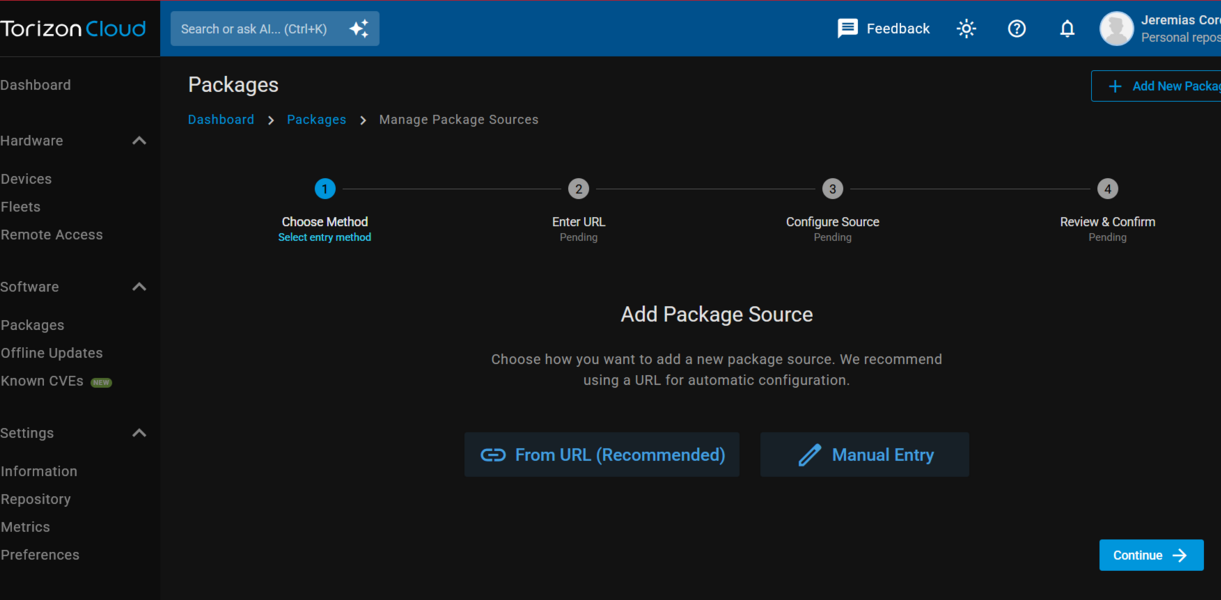
-
Paste the URL of the delegation reference JSON file hosted in the previous step:
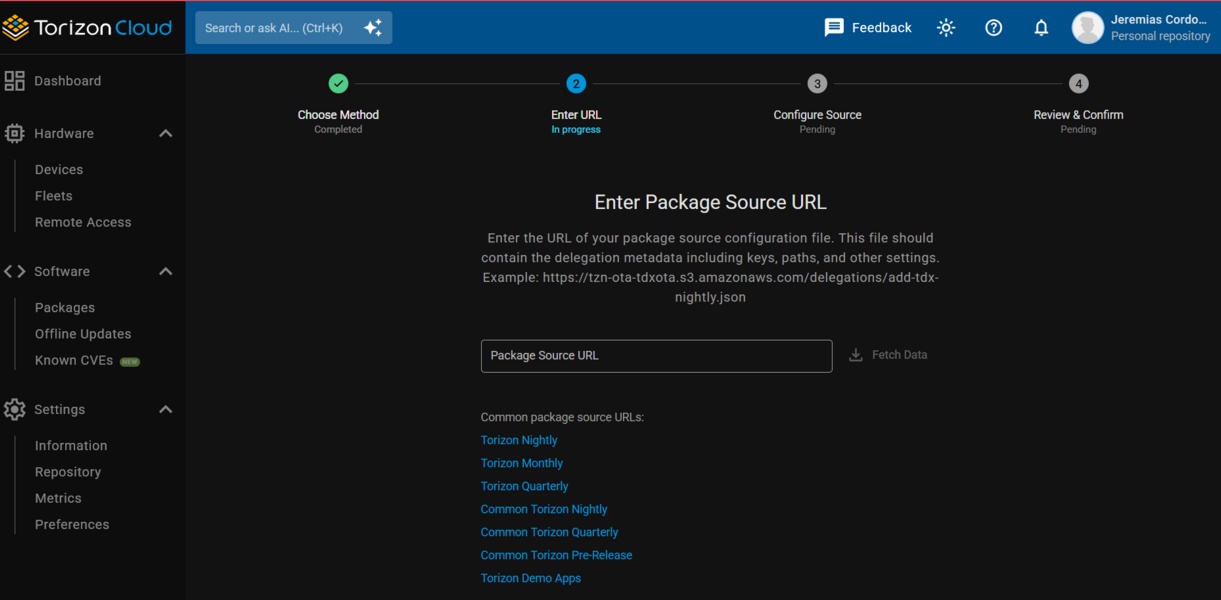
This file provides the information that the Web UI needs to add the new package source.
This procedure adds the package source only to the account where it is performed.
Automate with a CI/CD Pipeline
A CI/CD pipeline can automate the preceding steps by rebuilding and republishing the package source whenever new packages become available.
For a complete example of a pipeline that builds and publishes an OS/OSTree package source, with GitHub Actions for automation and AWS to host the generated files, refer to the following references:
- GitHub CI/CD workflows: commontorizon/commontorizon-manifest
- Automation scripts: commontorizon/Containerfiles
These references demonstrate a functional workflow that builds and publishes an OSTree package source end to end.