Secure Offline Updates Overview
Introduction
In this article, you learn the basics about Secure Offline Updates with Torizon OS.
What is the Torizon Secure Offline Updates Feature?
Secure Offline Updates is a feature of Torizon Cloud. It supplements Torizon Remote Updates, using the same technology stack: OSTree and Aktualizr. Offline Updates brings the capability to perform secure updates to Torizon OS based devices that may not be able to update remotely. For example, devices that rarely have an internet connection, have limited bandwidth, have no network connection at all, or are permanently on an airgapped network.
You can learn more about updates with Torizon on the overview article, and for more in depth knowledge, read the Torizon Updates Architecture.
Main Features
With the Offline Updates feature it is possible to:
- Execute full-stack, secure and reliable updates on devices without an internet connection
- Automatically trigger the update on a device with an update medium - USB, SD Card, or network volumes.
- Perform synchronous updates - both the OS and the Application as a single component
- Automatically rollback to the last working version of the OS or the application in case the update fails
- Block updates from happening from the application’s side, in case you have a critical application that cannot stop for an update to take place
- Create a single Lockbox for multiple devices with different hardware
Terminology
Many of the names and technologies used in Remote Updates are also used in Offline Updates. However, this article introduces some new terminology to talk about offline updates and how they are secured:
Lockbox
The Lockbox is the main thing to understand when using Offline Updates. When you deliver an update using Torizon Remote Updates, it's a bit like sending an electronic funds transfer: you use the Torizon Cloud to order the device to update to a particular software version, and then Torizon Cloud takes care of the rest, using secured communications channels (mTLS) and signed metadata that ensures the device can validate the software and installation instructions it receives. For offline updates, there's no direct communication between the platform and the device, so an alternate mechanism is needed to provide the same security guarantees: that's what is called the Lockbox.
A Lockbox is a collection of binary files, installation instructions, and software repository metadata. You can put it on a USB stick and carry it to a device, and the device has everything it needs to make sure that the contents of that Lockbox haven't been tampered with. Lockboxes derive from Uptane PURE-2, designed for securing updates of safety-critical automotive software.
The Update Process
The update processes of a device with Offline Updates and Remote Updates are similar since both are based on the same technology stack. You can see the workflow in the following diagram:
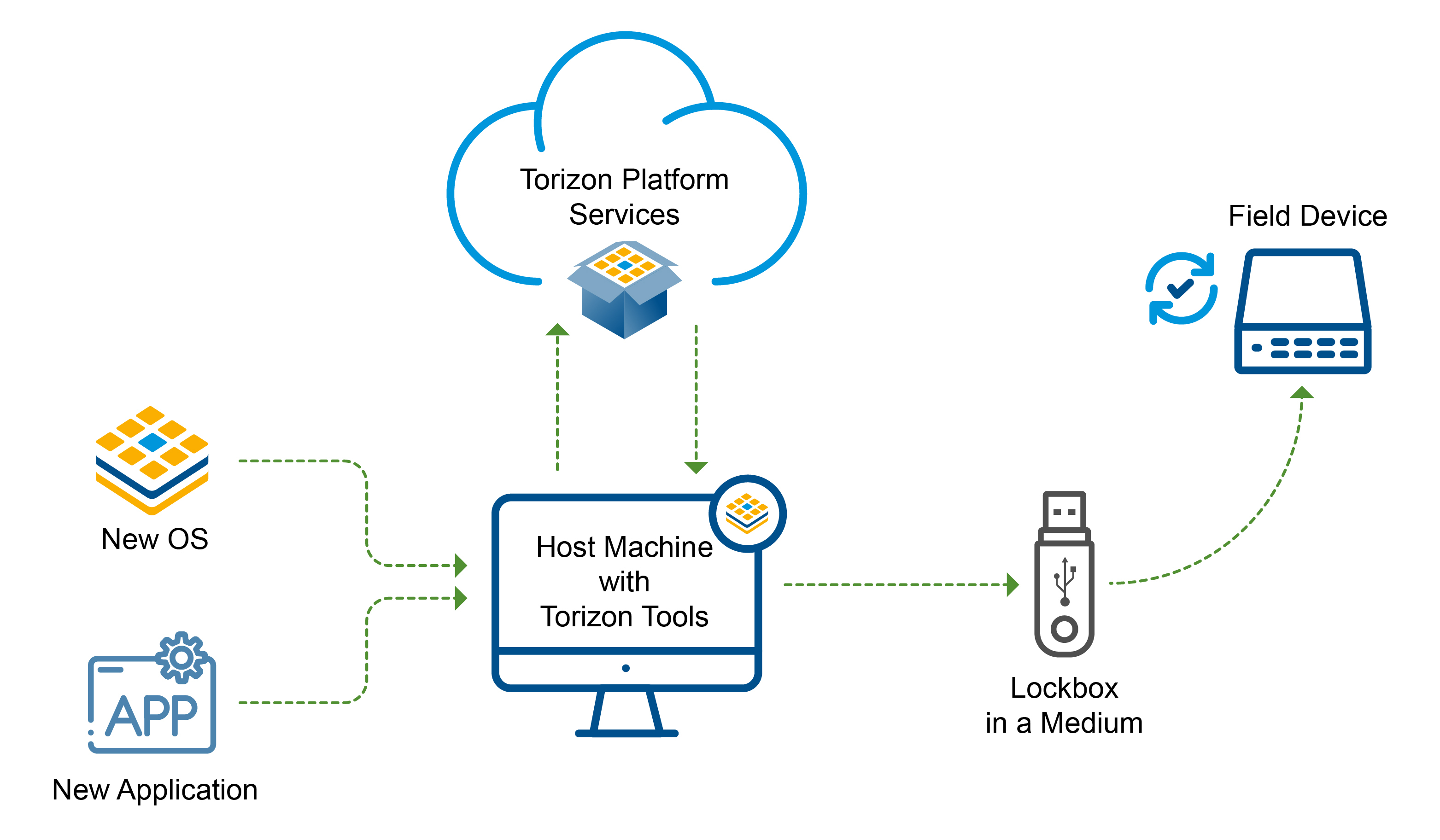
The process has four stages:
- Create the packages: upload your Torizon OS image, your application, or both to the Torizon Cloud, where each one becomes a signed software package.
- Define the Lockbox: in the Torizon Cloud Web UI, select the packages that go into the Lockbox and give it a name, so that Torizon Cloud can generate signed install instructions allowing your devices to trust the update.
- Create the Lockbox: use TorizonCore Builder to download the files, metadata, and signatures that the device uses for validation, then copy them onto a storage medium of your choice.
- Deploy the offline update: insert the update medium into the device and wait for the update to finish. The process is fully automated and no user intervention is required at any time. If you are performing an OS or synchronous update, the board automatically reboots once.
Configure your device for offline updates before you deploy a Lockbox. Follow How to Use Secure Offline Updates with Torizon OS to set the correct path to the storage medium's mount location.
Next Steps
Take your next steps with a practical example with Secure Offline Updates:
- First Steps with Secure Offline Updates: walks through each of the preceding stages in detail.
Webinars
Toradex has presented webinars about Secure Offline and Online Updates and you can watch them on demand.
Secure Offline and Online Updates for Linux Devices
Learn more about this webinar on the landing page, or watch it following:
Torizon Secure Offline Updates
Watch this webinar to understand how Toradex's Torizon enables secure offline updates.