How to Assess Torizon OS Images for CVEs
Introduction
The Torizon Vulnerability Manager Overview explains what the add-on does and describes the six steps of a vulnerability management process. This article applies those steps to one specific Torizon OS image and shows the actual report it produces.
This article explains how to:
- Identify the exact Torizon OS version running on the target device
- Open the vulnerability report for that version in Torizon Cloud
- Read the CVEs Overview and the CVE Breakdown
- Interpret the severity, analysis, and justification of a single CVE
- Export the SBOM with its VEX data for third-party tooling
The procedure applies to any Toradex module supported by Torizon OS with a vulnerability report published on Torizon Cloud. This article uses a Colibri iMX7D running Torizon OS 7.7.0 as the example device.
This article complies with the Typographic Conventions for Toradex Documentation.
Prerequisites
- A Toradex module that Torizon OS supports with a published vulnerability report
- An account on Torizon Cloud
- The Vulnerability Manager add-on, or an active Vulnerability Manager trial. Access to Vulnerability Manager describes what a free account sees and how to start the trial.
Identify the Torizon OS Version on the Target Device
A vulnerability report describes one Torizon OS build. Before opening any report, determine which build the device runs; otherwise, the CVE list may not match the software in the field. For this, run the tdx-info command on the target device:
# sudo tdx-info
Software summary
------------------------------------------------------------
Bootloader:               U-Boot
Kernel version:           6.6.143-7.7.0 #1-Torizon SMP PREEMPT Wed Feb 18 15:08:50 UTC 2026
Kernel command line:      root=LABEL=otaroot rootfstype=ext4 quiet logo.nologo vt.global_cursor_default=0 plymouth.ignore-serial-consoles splash fbcon=map:3 ostree=/ostree/boot.1/torizon/797a2e0be978367064ce638347f3b37acf2149e26c41d9fe0a1ee7516456239b/0
Distro name:              NAME="Torizon OS Upstream"
Distro version:           VERSION_ID=7.7.0-build.40
Distro variant:           VARIANT="Docker"
Hostname:                 colibri-imx7-emmc-06674594
------------------------------------------------------------

Hardware info
------------------------------------------------------------
HW model:                 Toradex Colibri iMX7D 1GB (eMMC) on Colibri Evaluation Board V3
Toradex version:          0039 V1.1A
Serial number:            06674594
Processor arch:           armv7l
------------------------------------------------------------
The Distro version line of the Software summary section identifies the release and build number to look for in Torizon Cloud.
Record this value together with the resulting report. An assessment is only evidence of compliance if it names the exact build it applies to.
Open the Vulnerability Report
Torizon Cloud publishes a report per Torizon OS package version.
- Open the Vulnerability Manager tab in Torizon Cloud. This page lists the packages that have a vulnerability report available. The
Packagespage also links to it throughPackages with known CVEs.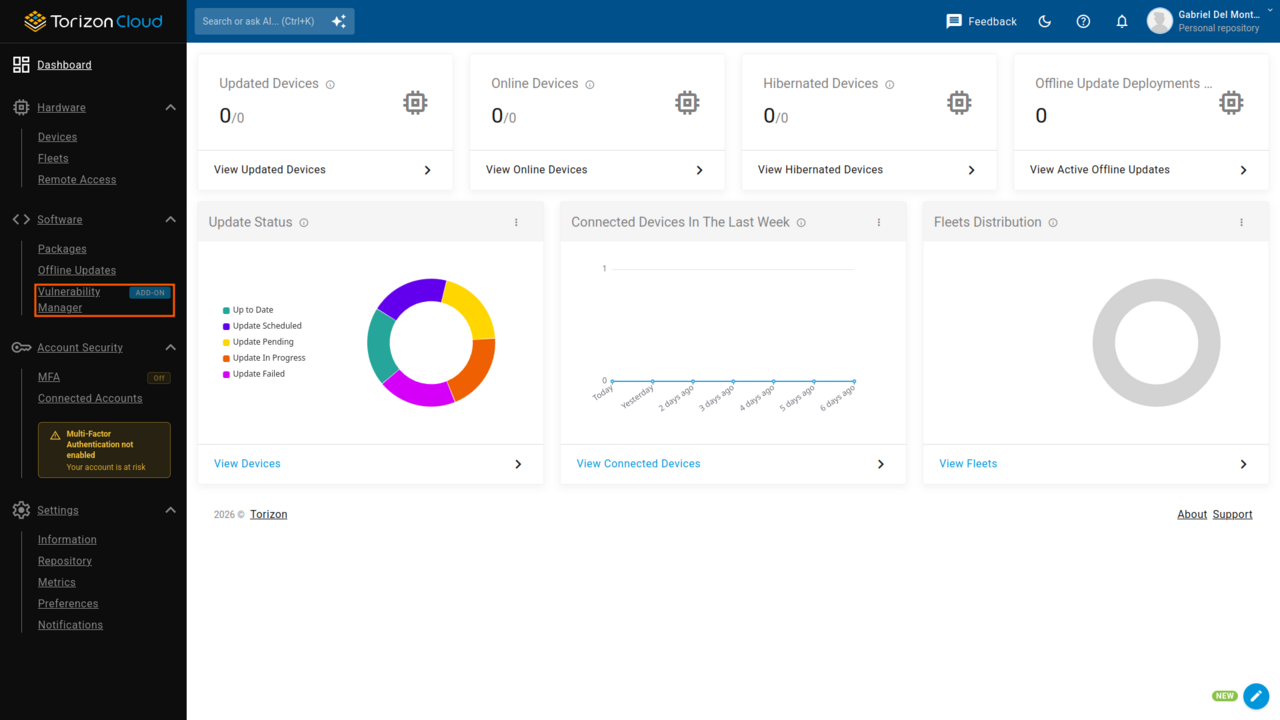
- Select the Torizon OS package that matches the target module, and then the version that
tdx-inforeported. For a Colibri iMX7D, the package name contains thecolibri-imx7-emmcmachine name.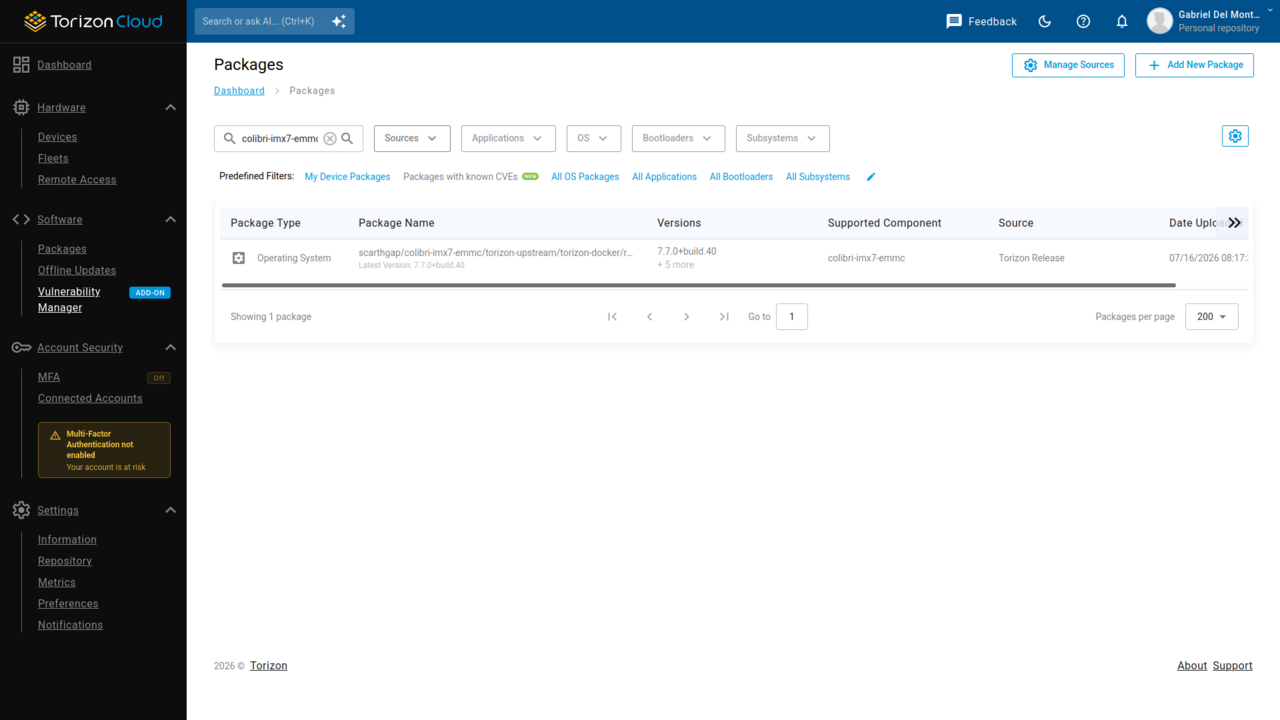
- Select
CVE Analysisto open the report.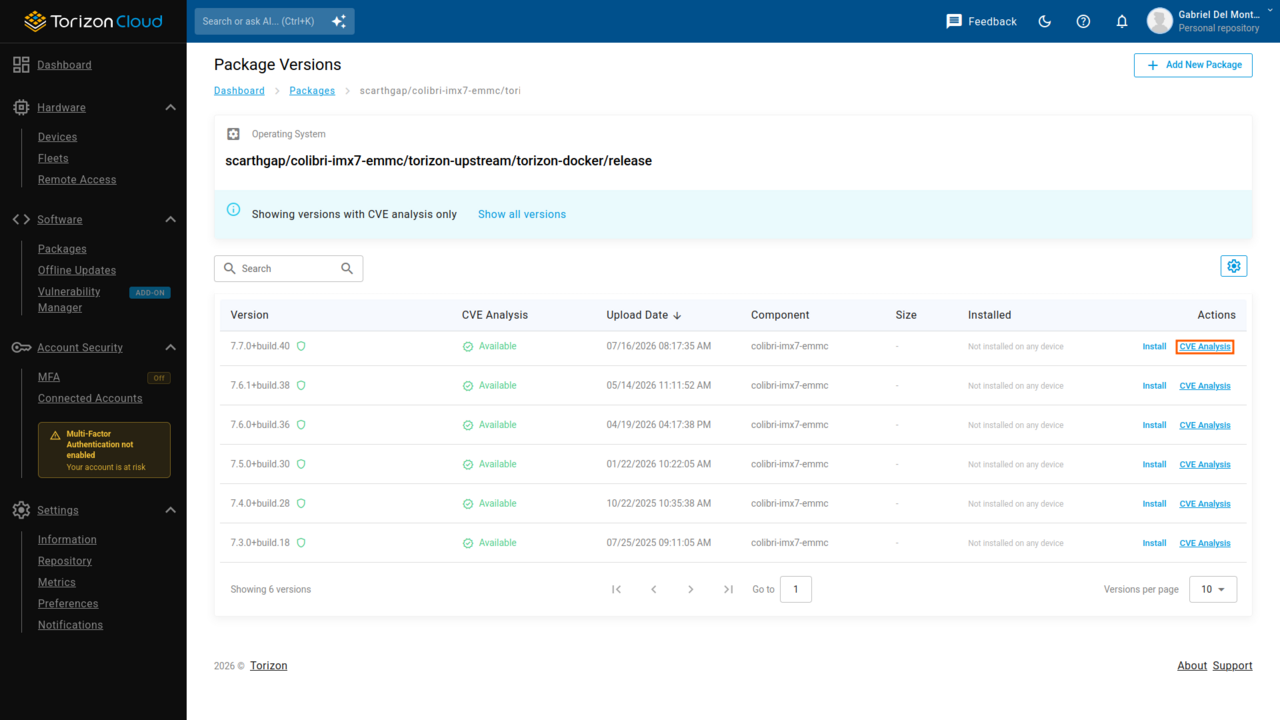
Torizon Cloud rescans every published release daily, so a report reflects the vulnerability databases on the day it is read. Newly disclosed CVEs appear as soon as the databases publish them, so the same build can show new entries later.
Reports exist for published Torizon OS releases. If the target device runs a nightly or a customized image, no report matches it exactly. Assess the release that the image derives from, and account for local changes separately.
Read the CVEs Overview
The CVEs Overview panel summarizes the whole report. This panel shows the total number of CVEs alongside counts for the categories that need attention first, and a multi-level chart that breaks the total down by component, severity, and analysis state.
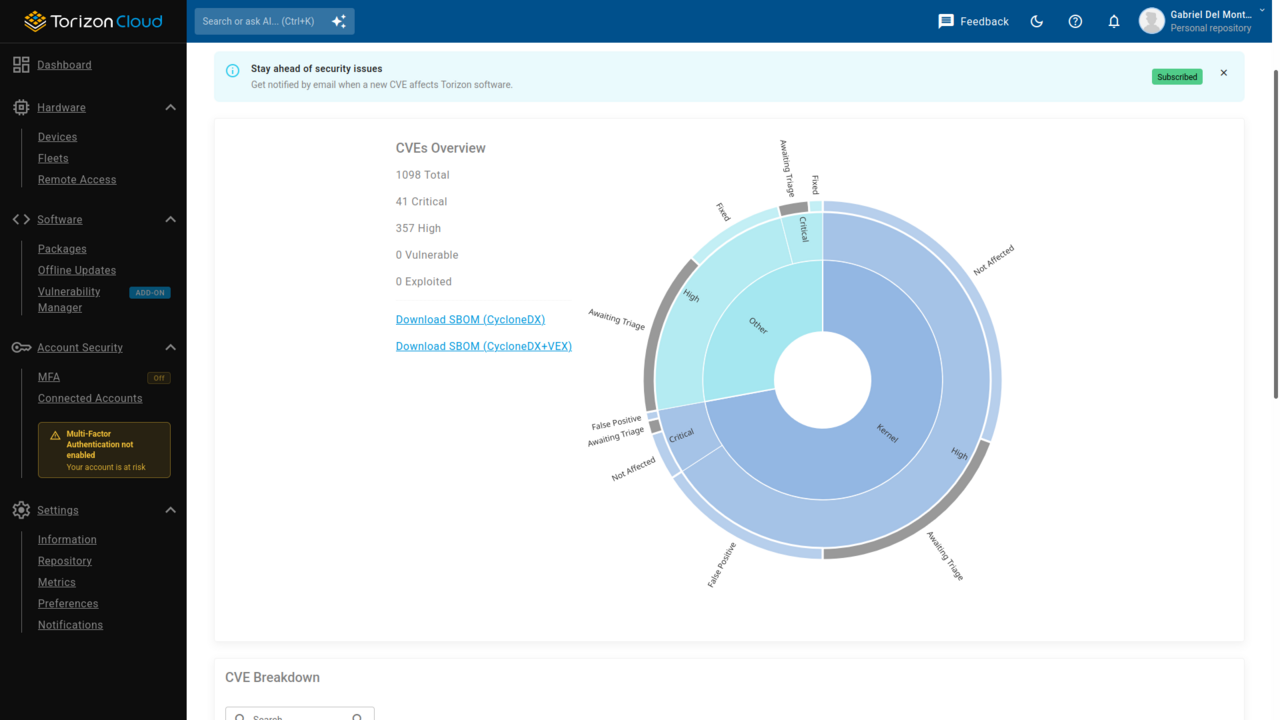
Select any chart segment to filter the report to that subset. This is the fastest way to answer a narrow question, such as how many critical CVEs affect the Linux Kernel in this build.
It is normal to have a large total. Vulnerability scanners report every CVE that the databases associate with a component version, without knowing how the product builds, configures, or reaches that component. The databases are also not always accurate about which versions of a package a CVE affects, so some entries are false positives outright. The Torizon security team rules out the entries it can eliminate with certainty, which usually removes 50% to 70% of the reported total.
Filter the CVE Breakdown
The CVE Breakdown table lists every CVE in the build with four filters:
- Type
- Severity
- Analysis
- Justification
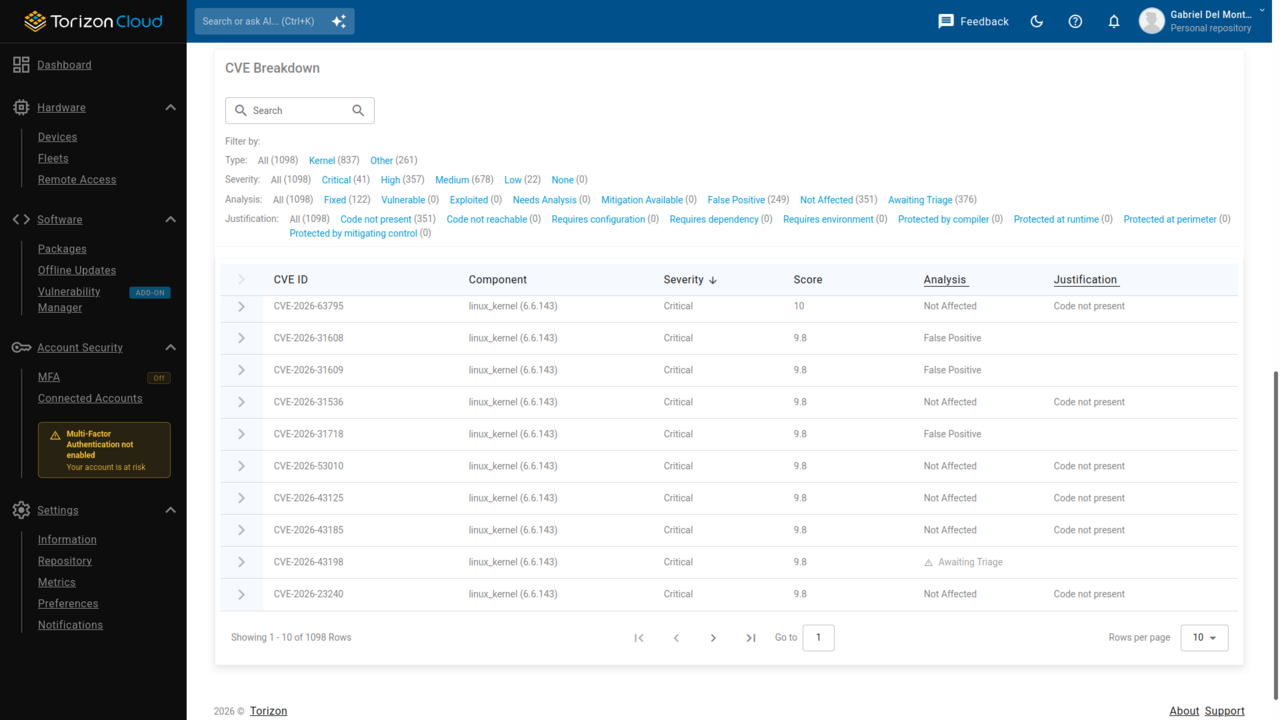
Type
Restricts the report to Kernel components or to the remaining components of the image. The Linux Kernel usually accounts for the largest share of the CVEs in the report, because scanners list every known Kernel CVE for that version without considering the build configuration or the architecture. Separating it makes the rest of the image easier to review.
| Type | Meaning |
|---|---|
| Kernel | Vulnerabilities in the Linux Kernel |
| Other | Vulnerabilities in every other component, such as system libraries and utilities |
Severity
Reflects the potential impact of a vulnerability. The CVSS score determines this value.
| Severity | Meaning |
|---|---|
| Critical | Catastrophic impact, up to total failure of the system |
| High | Significant impact, up to complete compromise of the system |
| Medium | Moderate impact, up to partial compromise of the system |
| Low | Minimal impact, such as a small disruption |
| None | The report carries no severity rating for this entry |
Analysis
States what the Torizon security team determined about the vulnerability in the context of Torizon OS.
| Analysis | Meaning |
|---|---|
| Fixed | The vulnerability is resolved in this build |
| Vulnerable | The vulnerability is present in this build and an attacker can exploit it |
| Exploited | Attackers actively exploit the vulnerability in the wild |
| Needs Analysis | The vulnerability requires a manual review to determine its impact |
| Mitigation Available | The vulnerability is present in this build, and the report recommends a mitigation for it |
| False Positive | The scanner attributed the vulnerability to this component incorrectly |
| Not Affected | A documented reason explains why the vulnerability does not affect this component |
| Awaiting Triage | No analysis of the vulnerability exists yet |
Torizon security experts triage every high-severity and critical-severity vulnerability. Medium-severity and low-severity vulnerabilities are not part of that manual analysis process, so they more often carry Needs Analysis or Awaiting Triage.
For a practical first pass, filter the CVEs to Vulnerable and Exploited. Those are the entries that need a decision. The Torizon security team already accounted for everything it ruled out, and supplied a justification that serves as evidence.
Justification
Explains why a vulnerability does not require immediate patching. It accompanies the Not Affected and Mitigation Available states and follows the Vulnerability Exploitability Exchange (VEX) standard, so it carries into a third-party vulnerability management tool unchanged.
| Justification | Meaning |
|---|---|
| Code not present | The vulnerable code is not part of the image |
| Code not reachable | The vulnerable code is part of the build but cannot execute |
| Requires configuration | Exploitation requires a specific configuration |
| Requires dependency | Exploitation requires another dependency that the build does not include |
| Requires environment | Exploitation requires specific environment conditions |
| Protected by compiler | Compiler protections prevent exploitation |
| Protected at runtime | Runtime protections prevent exploitation |
| Protected at perimeter | Perimeter network security prevents access |
| Protected by mitigating control | Another security control prevents exploitation |
Analyze a Single CVE
Select a row to expand it. A CVE entry lists the affected component and its version, the CVSS score behind the severity, the analysis state, the justification, and a plain-language explanation that the Torizon security team writes. An external link opens the original record, for example in the National Vulnerability Database.
Read the explanation before researching the CVE independently. It states whether the vulnerability applies to a typical Torizon deployment and why, which is usually enough to close the entry or to escalate it.
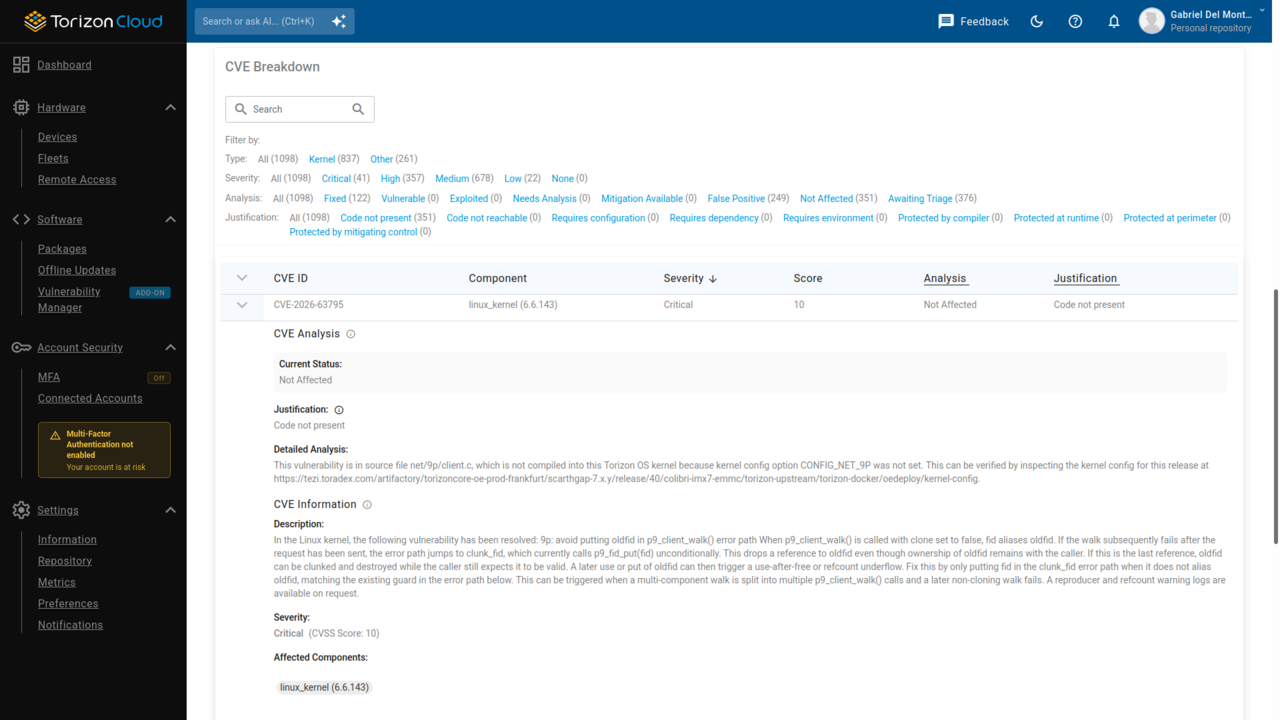
After reaching a decision for an entry, act on it:
- Not affected in the product. Record the analysis state and the justification in a third-party vulnerability management tool, and keep the pre-populated fields. The report serves as the evidence.
- Relevant to the product. Check whether a later Torizon OS release fixes it, then plan the update. Refer to the remediation section of this article.
- Relevant, with no fix available. Apply the mitigation that the entry describes, or contact the Toradex support team if the product threat model differs from the assumptions in the analysis.
The analysis assumes a threat model that reflects typical embedded Linux deployments. If the product exposes interfaces or runs configurations that this model does not cover, review the entries that carry Mitigation Available against the product threat model. CVE Analysis Methodology and Threat Model describes the assumptions behind the analysis.
Export the SBOM with VEX Data
The CVEs Overview panel offers the SBOM for the build in CycloneDX format, including its VEX data, which together form a NIST SP 800-161 Vulnerability Attestation Report. Downloading it keeps the assessment in local systems and feeds it to third-party tooling; store the file alongside the build it describes.
Cross-reference the CycloneDX SBOM with the SPDX SBOM for the same release, and confirm the build process that produced them with in-toto attestations.
The add-on gates the VEX analysis, not the SBOM itself: Toradex publishes an SPDX and a CycloneDX SBOM for every Torizon OS build on Toradex Artifactory at no cost. For the SBOM formats Toradex publishes, where to find them outside Torizon Cloud, and how to parse them, refer to the SBOM Reports documentation. For how the VEX statuses and justifications work, refer to the VEX Reports documentation.
Remediate and Release an Update
An assessment closes after the fix reaches the affected devices in the field.
- Identify a Torizon OS release that fixes the relevant entries. Quarterly releases carry security patches for the whole stack, including thousands of upstream Linux Kernel patches tested for compatibility with every Toradex module. Moving to a supported release therefore resolves most entries without further work. Refer to the Torizon OS Upgrade Notes documentation for the release history and the CVEs that each release fixes.
- If the product uses a customized image, rebuild it on the fixed release with TorizonCore Builder.
- Sign the image and push it to the Torizon Cloud repository.
- Roll the update out to the affected devices, then confirm it applied. Torizon Cloud reports which devices in the fleet run the affected build, so the rollout reaches every device that needs it.
Repeat the assessment against the new build to confirm that the entries no longer appear, and keep the report as the record of the fix.
Toradex patches vulnerabilities that are likely to affect Torizon OS users on a rapid schedule, as with the sudo vulnerability patched in June 2025: the fix reached Torizon OS nightly builds in just over a week, with fully supported releases of Torizon OS 6 and Torizon OS 7 following in less than one month.