Partner Demo Container - Crank Storyboard
Crank Storyboard - GUI Design and Development Software
Crank Software is the company that develops Crank Storyboard, a GUI design and development tool created exclusively for embedded systems. Storyboard’s designer-developer parallel workflow environment accelerates design iteration and the overall development process by up to 50% while retaining design vision with maximum performance.
Crank has now added support for the Toradex Linux platform Torizon. Supporting Toradex System on Modules based on the NXP® i.MX 6, i.MX 7 and i.MX 8
Crank Storyboard Container for Torizon
Crank Software has created a Storyboard Container for Torizon and uploaded it to Docker hub. Some of the advantages of using containers are as follows:
- You can keep applications independent
- Use different runtimes
- Encapsulate application dependencies in the container
- Maintenance and deployment is easier
Supported Modules
The following Computer on Modules are supported:
- Apalis iMX8
- Apalis iMX6
- Colibri iMX7 (Coming Soon)
- Colibri iMX6
- Verdin iMX8M Mini
Supported Displays
- Capacitive Touch Display 7" Parallel
- Capacitive Touch Display 10.1" LVDS
- Resistive Touch Display 7" Parallel
- HDMI/DVI Screens
While you can use a wide variety of displays and monitors, additional configuration may be required for a specific setup.
A section at the end of this guide provides instructions about the display and touch screen configuration.
Recommended Setup
In order to provide a good experience with the Crank Demonstration, due to the static resolution (1280x720) of the demo, Toradex advises you to use the following hardware combination:
- Apalis iMX8 with 10.1 LVDS or HDMI
- Apalis iMX6 with 10.1 LVDS or HDMI
Multiple displays will just extend the demo application, making it show up only on one display in case you have both HDMI and LVDS connected at the same time.
While it's recommended to use this hardware combination for this specific demonstration, all Toradex displays and Torizon compatible modules should work with Crank.
Intended Use
This partner demo container is meant for the evaluation of the technology. It is suitable for development, but not for production.
How to Get Started
This section provides instructions for you to quickly get started with Crank Storyboard.
Prerequisites
- Toradex SoM with Torizon installed. For instructions about how to install Torizon on your board, refer to Toradex Quickstart Guide
- (helpful) Basic understanding of Docker and
docker runcommand options - An HDMI screen connected to the Toradex SoM board. Optionally, you can use one of the supported displays.
Alternative 1: Executing the Demo through Portainer
The image TorizonCore with evaluation containers has many different demos. For instructions about how to install Torizon on your board, refer to Toradex Quickstart Guide.
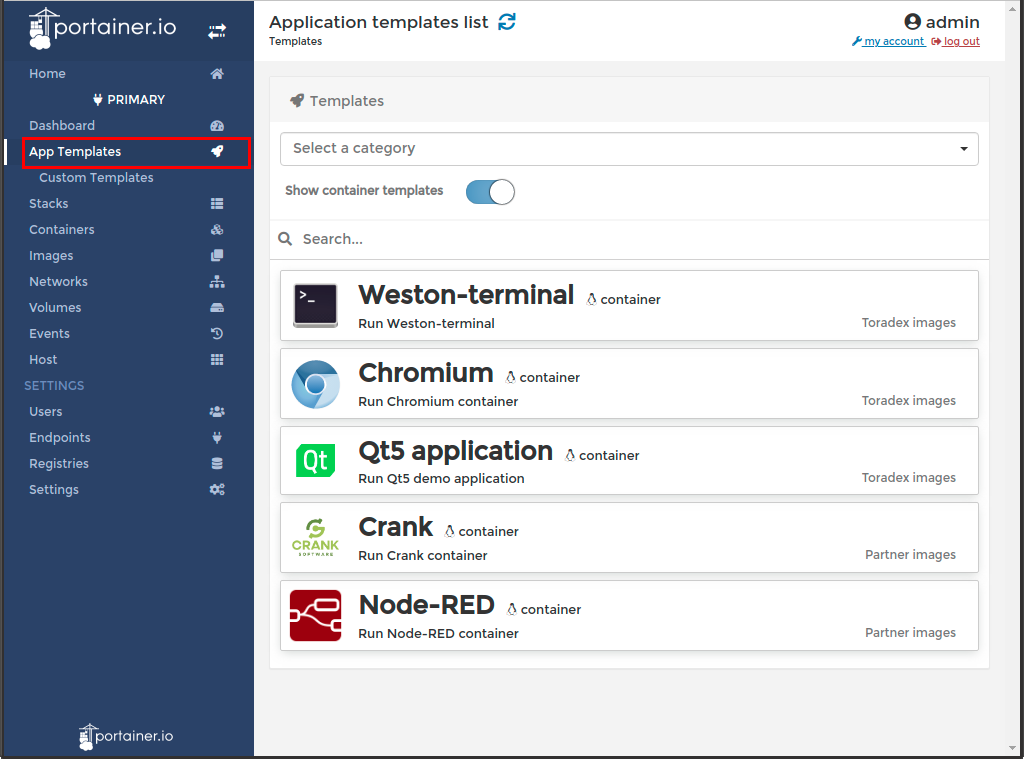
With Portainer opened, explore it by going to the App Templates section in Portainer and click on the Crank template.
Alternative 2: Executing the Demo by the Command-Line
Run a Weston Container
The Storyboard container has been built to interface with Weston, so we need to launch the Weston interface. Fortunately, this has been built into a handy container that can be downloaded and run.
Open a shell connection to the Torizon system (serial or ssh).
$ ssh torizon@<ip address>
Now you can run the Weston Container. Just choose your architecture from the boxes below:
Make sure you have a head (display or an HDMI screen) connected to the board before starting it, otherwise the application will not start. Check the Setting up Displays with Torizon article if you need more information.
From your board's terminal, download the docker-compose file:
$ wget https://raw.githubusercontent.com/toradex/torizon-samples/bullseye/crank/docker-compose.armhf.yml
Now we can run the Storyboard container working with the Weston interface. This has been configured to leverage the OpenGL hardware acceleration on the platform.
$ docker-compose -f docker-compose.armhf.yml up
This command will download the container and then run it, once it’s downloaded it will launch directly.
This container has been built to automatically launch one of our oven demo applications using Crank Storyboard.
Make sure you have a head (display or an HDMI screen) connected to the board before starting it, otherwise the application will not start. Check the Setting up Displays with Torizon article if you need more information.
By executing the following command you are accepting the terms and conditions of the NXP's End-User License Agreement (EULA).
From your board's terminal, download the docker-compose file:
$ wget https://raw.githubusercontent.com/toradex/torizon-samples/bullseye/crank/docker-compose.arm64.yml
Now we can run the Storyboard container working with the Weston interface. This has been configured to leverage the OpenGL hardware acceleration on the platform.
$ docker-compose -f docker-compose.arm64.yml up
This command will download the container and then run it, once it’s downloaded it will launch directly.
This container has been built to automatically launch one of our medical demo applications using the Crank Storyboard.
Next Steps
The following video shows the walkthrough of these steps and how you can deploy your own custom application using Storyboard.
Download your full-featured free trial of Crank Storyboard on Crank's Website.
Running the demo on a Display
For the displays recommended by Toradex, go to Setting up Displays with Torizon page.
Related Articles
- Video Demonstration of Crank Storyboard on Colibri iMX7
- Guest webinar: Bringing UIs to Life with Crank Software and Toradex
- Crank Storyboard running on Toradex Hardware
Release Notes
These release notes are strictly related to the test of the Crank Storyboard container in Toradex hardware.
7.1
- Release: November/2021
- Released for 32 and 64-bit SoMs.
7.0.1
- Release: October/2021
- Updated to work with Torizon 5.4.0
- Only updated for 64-bit i.MX 8-based SoMs. For 32-bit SoMs, remain on Crank 6.2.
6.2
- Updated to work with Torizon 5
6.1
- Initial release.